
Audit Log
Compliance-grade trail of every governance action in your tenant.
Why it exists
When a CVE drops, the auditor's question is "show me proof you patched every service." When a renewal lands, the procurement question is "show me that the controls work." Both questions need an answer that doesn't depend on spreadsheets or screenshots — they need a query you can run and a CSV you can attach.
What's captured
- Campaign lifecycle.
audit.campaign.launched,audit.campaign.recalled,audit.campaign.synced - Approval workflow.
audit.approval.pending_created,audit.approval.approved,audit.approval.cancelled - Configuration changes.
audit.config.fleet_updated,audit.config.auto_nudge_updated,audit.config.approval_updated,audit.template.saved,audit.template.instantiated,audit.template.deleted - Nudge operations.
audit.nudge.sent,audit.nudge.bulk_sent - Data access.
audit.access.campaign_state,audit.access.config,audit.access.outcome_metrics
Every entry records timestamp, actor account ID + display name, target type and id, the action that occurred, an outcome lozenge (success, failure,blocked), and optional structured details.
How it works
- Persistence. Chunked Forge Storage adapter (50 entries per chunk, up to 50 chunks) so the log grows beyond the 32 KB per-key limit without losing entries.
- Retention. 180 days by default — longer than outcome events because compliance auditors typically request 6–12 months of history. Daily prune piggybacks on the existing scheduled trigger.
- Filters. Event type, outcome, actor account ID, target type, and time window (since / until) — all enforced at the resolver layer with Zod-validated input.
- Admin-gated. Reads require Jira administrator permission. Non-admin attempts are themselves audited as
outcome=blocked. - CSV export. One-click download of the visible window, properly escaped for spreadsheets.
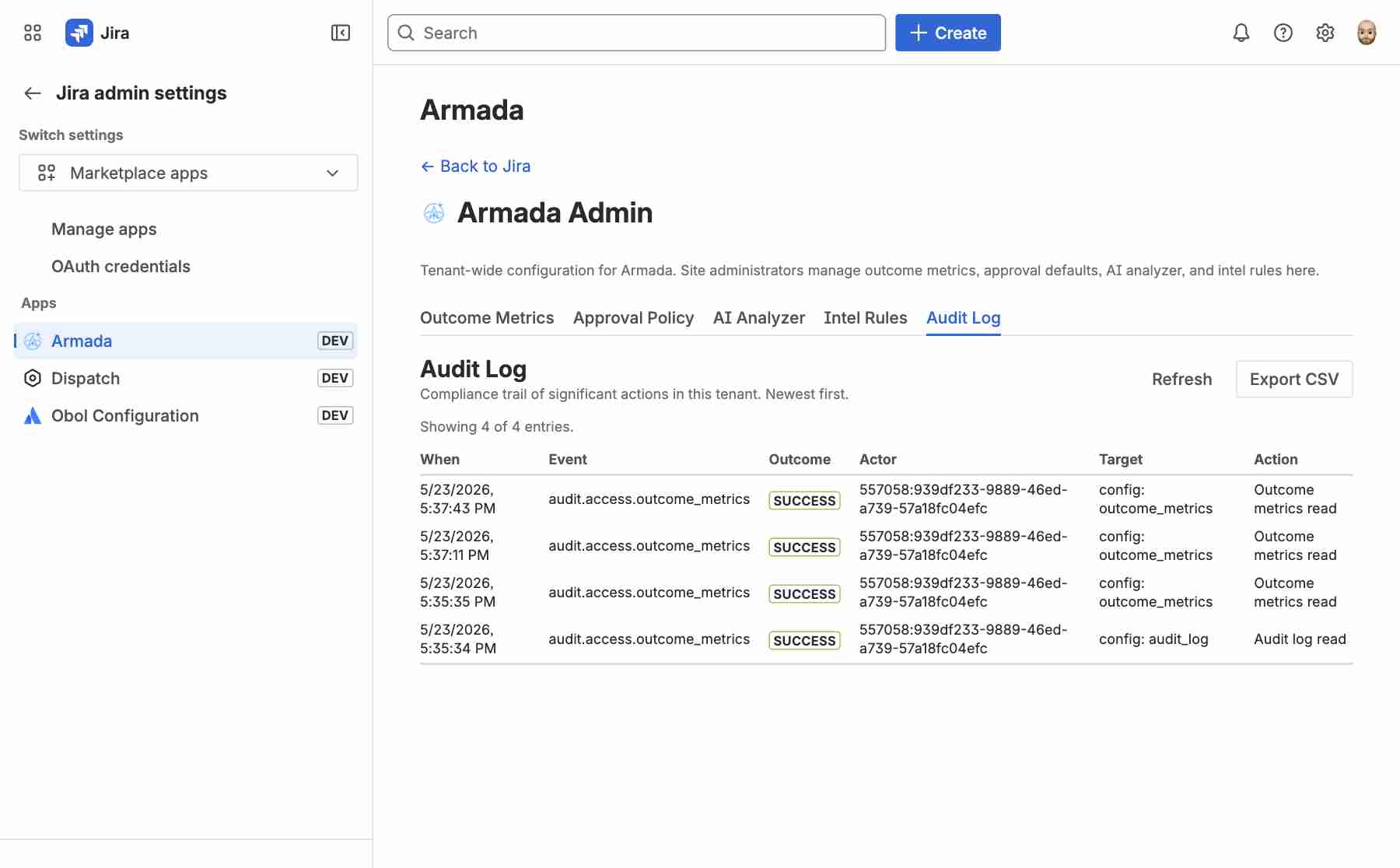
Built for the renewal conversation
Pull the last 30 days, filter to outcome=blocked, export the CSV. Walk that into the security review. Pull the last 90 days, filter toaudit.approval.approved, hand it to the auditor. The Armada audit log is the answer to "prove it" that doesn't need a custom Confluence page.
Privacy
Account IDs are stored in full for accountability but displayed truncated in aggregate counters and Forge log streams. Audit entries do not capture issue content beyond a short action label and structured details. Tenant data isolation is inherited from Forge.